Best Landing Page Builders for Marketers in 2026
Best Landing Page Builders for Marketers in 2026

For most paid-ad and conversion-focused campaigns, Unbounce is the single best landing page builder for U.S. marketers who need built-in A/B testing, AI-driven traffic routing, and fast iteration without touching code. That said, the right tool depends heavily on your budget, team size, and campaign type.
Quick shortlist:
- Unbounce — best for CRO-first paid campaigns with Smart Traffic auto-optimization
- Instapage — best for enterprise teams needing personalization at scale
- Leadpages — best for creators and small businesses who want AI-assisted drafts fast
- Swipe Pages — best for mobile-first and AMP-focused ad funnels
- Carrd / MailerLite — best free or near-free options for creators just starting out
Dedicated landing page platforms consistently outperform general website builders in conversion rate optimization because they ship with deeper A/B testing, analytics, and purpose-built templates. If you’re running paid traffic and every click costs money, that gap matters.
Table of Contents
- Which landing page builders should you compare?
- Detailed reviews: what each builder actually does well
- How to choose the right landing page builder for your campaign
- Which builder wins for your specific use case?
- How we tested and compared these tools
- What’s changed in 2026: AI, global blocks, and auto-optimization
- How do these tools compare on customer support?
- Mobile responsiveness: which builders get it right?
- SEO capabilities: what each builder actually supports
- Do you own your pages, and can you export them?
- What do real users say about these tools?
- Key Takeaways
- The feature list isn’t the real decision
- When a landing page builder isn’t enough
- Sources and further reading
Which landing page builders should you compare?
| Tool | Best for | Price from | A/B testing | Templates & drag-and-drop | Integrations | Page speed / AMP | AI features | Scalability |
|---|---|---|---|---|---|---|---|---|
| Unbounce | CRO / paid ads | $99/mo | Yes (all plans) | — | HubSpot, Salesforce, Zapier | Fast CDN hosting | Smart Traffic AI routing | Global scripts, multi-page |
| Instapage | Enterprise personalization | $199/mo | Yes (Build+) | 500+ templates, pixel-perfect | Marketo, Salesforce, HubSpot | Thor Render Engine | AI copy & personalization | AdMap, team collaboration |
| Leadpages | SMBs & creators | $49/mo | Yes (Pro+) | 200+ templates, drag-and-drop | Mailchimp, Zapier, Stripe | Fast hosted pages | AI 60-second page drafts | Alert bars, pop-ups |
| Swipe Pages | Mobile-first / AMP | $39/mo | Yes (Growth+) | — | Zapier, Mailchimp, HubSpot | AMP pages | Swipe Genie AI generator | Smart blocks |
| Landingi | Agencies / volume | $29/mo | Yes (Automate+) | 400+ templates, drag-and-drop | Zapier, HubSpot, ActiveCampaign | Fast CDN | AI copy assist | Multi-account, white-label |
| HubSpot | CRM-native funnels | $20/mo (Starter) | Yes (Pro+) | 30+ templates, drag-and-drop | Native CRM, Salesforce | Moderate | AI content tools | Full CRM suite |
| Elementor | WordPress sites | Free / $59/yr | Via plugins | — | WooCommerce, Zapier | Depends on hosting | AI builder (beta) | Theme builder |
| ClickFunnels | Full sales funnels | $97/mo | Yes (all plans) | — | Stripe, PayPal, Zapier | Moderate | AI funnel builder | Multi-step funnels |
| GetResponse | Email + landing pages | $19/mo | Yes (Email Mktg+) | 200+ templates, drag-and-drop | Native email, Zapier | Fast hosted | AI email + page tools | Webinar, automation |
| Carrd | Simple one-pagers | Free / $19/yr | No | — | Stripe, Mailchimp | Very fast | None | Limited |
| MailerLite | Email-first creators | Free / $9/mo | Yes (Growing Business) | 50+ templates, drag-and-drop | Shopify, WooCommerce, Zapier | Fast hosted | AI writing assistant | Automation, pop-ups |
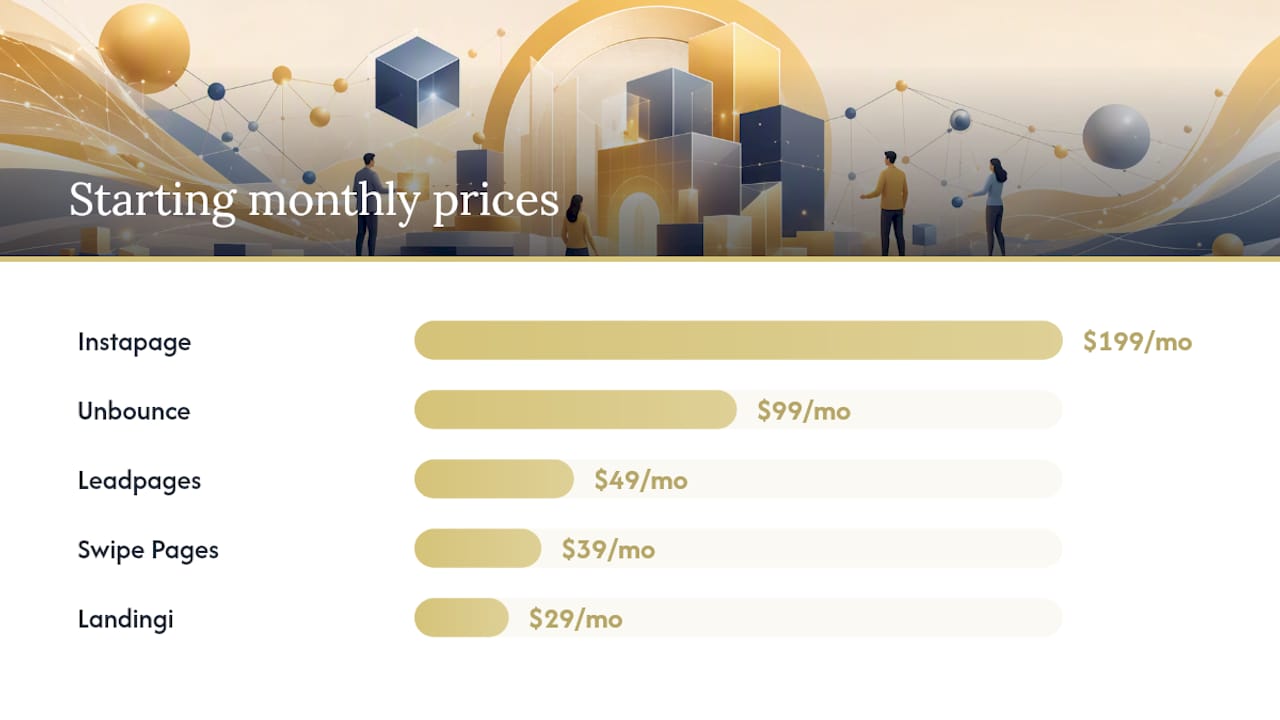
A/B testing access note: Unbounce includes A/B testing on every paid plan. Leadpages gates it to the Pro tier ($99/mo). HubSpot requires the Professional plan ($800/mo) for true A/B testing. Instapage’s Build plan starts at $199/mo and includes experimentation.
Detailed reviews: what each builder actually does well
Unbounce
Unbounce is the closest thing to a purpose-built conversion lab. Its Smart Traffic feature uses AI to route each visitor to the variant most likely to convert, drawing on data from billions of conversion events across the platform. You don’t need to wait for statistical significance the way you do with traditional A/B tests. The drag-and-drop editor is genuinely flexible, and the Global Scripts feature lets you inject custom tracking code once and apply it across every page.
Standout feature: Smart Traffic AI routing with no-code A/B testing
Price from: $99/mo
Best for: Paid-ad teams running continuous optimization
Pros:
- A/B testing and Smart Traffic on all paid plans
- Custom JavaScript injection for advanced tracking
- Strong template library with conversion-focused layouts
Cons:
- Pricing jumps sharply at higher traffic tiers
- No native email marketing
- Steeper learning curve than Leadpages or MailerLite
Instapage
Instapage targets enterprise marketing teams who need personalization at scale. Its AdMap feature connects ad variants to specific landing page experiences, and the vendor claims personalized pages can lift conversions by up to 34%. The Thor Render Engine is designed for sub-second load times. Collaboration tools (real-time commenting, team workspaces) make it practical for agencies managing client approvals.
Standout feature: AdMap personalization + Thor Render Engine
Price from: $199/mo
Best for: Enterprise teams with large paid-ad budgets
Pros:
- Pixel-perfect editor with 500+ templates
- Advanced personalization and dynamic text replacement
- Strong integrations with Marketo and Salesforce
Cons:
- Most expensive option on this list
- Overkill for solo creators or small teams
- A/B testing requires the Build plan
Leadpages
Leadpages sits in a sweet spot for small businesses and creators who want to move fast. Its AI builder can generate a complete, on-brand landing page draft in roughly 60 seconds from a plain-language description, then hand you a drag-and-drop editor for refinements. Built-in A/B testing and heatmaps are available on the Pro plan. Alert bars and pop-ups are included, which most competitors charge extra for.
Standout feature: 60-second AI page generation with built-in heatmaps
Price from: $49/mo (Standard); A/B testing on Pro at $99/mo
Best for: Creators, coaches, and SMBs who need speed over enterprise depth
Pros:
- Fast AI-assisted page creation
- Heatmaps included (no third-party tool needed)
- Unlimited landing pages on all plans
Cons:
- A/B testing locked to Pro tier
- Less flexible editor than Unbounce
- Limited personalization features
Swipe Pages
Swipe Pages is built around one core premise: speed on mobile. Its AMP page support and “Swipe Genie” AI generator can pull brand colors, fonts, and copy from your existing URL and produce a draft in seconds. If your campaigns run on mobile-heavy platforms like Instagram or TikTok, the AMP advantage is real. A/B testing unlocks on the Growth plan.
Standout feature: AMP pages + Swipe Genie brand-extraction AI
Price from: $39/mo
Best for: Mobile-first ad funnels, especially social media campaigns
Pros:
- AMP support for near-instant mobile load times
- AI brand extraction from existing URLs
- Competitive pricing for the feature set
Cons:
- Smaller template library than Leadpages or Instapage
- Fewer native CRM integrations
- Smart blocks available but less mature than Unbounce’s
Landingi
Landingi is the volume play. With 400+ templates, white-label options, and multi-account management, it’s built for agencies handling many clients at once. The entry price is low, and the Automate plan unlocks A/B testing and event tracking. It won’t win on AI sophistication, but for agencies that need to spin up pages quickly across many accounts, it covers the bases.
Standout feature: White-label + multi-account management
Price from: $29/mo
Best for: Agencies managing high page volume across multiple clients
Pros:
- 400+ templates with a clean drag-and-drop editor
- White-label and sub-account options
- Affordable entry price
Cons:
- A/B testing requires the Automate plan
- AI features are basic compared to Unbounce or Leadpages
- Support quality varies by plan tier
HubSpot
HubSpot’s landing page builder is compelling if you’re already in the HubSpot ecosystem. The native CRM connection means every form submission flows directly into contact records, deal stages, and email sequences without a Zapier workaround. The trade-off: the landing page editor itself is less flexible than dedicated builders, and true A/B testing requires the Professional plan at $800/mo.
Standout feature: Native CRM integration with full contact attribution
Price from: $20/mo (Starter)
Best for: Teams already using HubSpot CRM who want one fewer tool
Pros:
- Seamless CRM and email automation connection
- Strong analytics and attribution reporting
- AI content tools included
Cons:
- A/B testing requires Professional plan ($800/mo)
- Editor is less flexible than Unbounce or Instapage
- Expensive if you only need landing pages
Elementor
Elementor is the dominant page builder for WordPress, with over 10 million active installs. It gives you deep design control and a massive ecosystem of third-party widgets. The catch: performance depends entirely on your hosting setup, and A/B testing requires a separate plugin like Nelio or Google Optimize alternatives. For WordPress-native teams, it’s hard to beat on flexibility. For everyone else, the hosting dependency is a real friction point.
Standout feature: Unmatched design flexibility within WordPress
Price from: Free; Pro at $59/yr
Best for: WordPress-native teams who prioritize design control
Pros:
- Huge template and widget library
- WooCommerce integration for ecommerce
- Low cost for the feature depth
Cons:
- Performance tied to hosting quality
- A/B testing requires third-party plugins
- Not a standalone hosted solution
ClickFunnels
ClickFunnels is less a landing page builder and more a full sales funnel platform. It’s designed around multi-step sequences: opt-in page, upsell, order form, thank-you page. If your campaign is a single landing page, it’s overkill. If you’re running a product launch with a full funnel, it handles the entire flow in one tool. The AI funnel builder on newer plans can draft a complete sequence from a product description.
Standout feature: End-to-end multi-step funnel builder
Price from: $97/mo
Best for: Product launches and ecommerce funnels with upsells
Pros:
- Built for complete funnel sequences, not just pages
- Native payment processing (Stripe, PayPal)
- Strong community and training resources
Cons:
- Expensive for single-page use cases
- Editor feels dated compared to Unbounce or Instapage
- Page speed can lag on complex funnels
GetResponse
GetResponse bundles landing pages with email marketing, webinars, and automation in one platform. For creators who want to capture leads and immediately drop them into an email sequence, it removes a layer of integration complexity. The landing page editor is solid, A/B testing is available on the Email Marketing plan, and the pricing is among the most competitive on this list.
Standout feature: Native email automation + landing pages in one tool
Price from: $19/mo
Best for: Creators and coaches building email lists with automated follow-up
Pros:
- Email + landing pages + automation in one subscription
- Competitive pricing
- 200+ templates with drag-and-drop editor
Cons:
- Landing page features less advanced than dedicated builders
- Limited personalization options
- AI tools are basic
Carrd
Carrd is the fastest way to publish a clean, functional one-pager on the internet. The free plan is genuinely usable, and the Pro plan at $19/yr is almost absurdly cheap. There’s no A/B testing, no advanced analytics, and no multi-page support. But for a creator who needs a link-in-bio page or a simple opt-in page before they’re ready to invest in a dedicated tool, nothing is faster.
Standout feature: Free tier + $19/yr Pro plan
Price from: Free; Pro at $19/yr
Best for: Creators and solopreneurs who need a fast, free starting point
Pros:
- Genuinely free tier
- Extremely fast to publish
- Clean, minimal templates
Cons:
- No A/B testing
- Very limited integrations
- Not suitable for complex campaigns
MailerLite
MailerLite is the best free option for creators who need both landing pages and email marketing in one place. The free plan supports up to 1,000 subscribers and includes landing pages, pop-ups, and basic automation. The AI writing assistant helps draft copy. A/B testing unlocks on the Growing Business plan at $9/mo. For a creator just starting to build a list, it’s the most complete free package available.
Standout feature: Free email + landing pages + automation for up to 1,000 subscribers
Price from: Free; Growing Business at $9/mo
Best for: Budget-conscious creators building their first email list
Pros:
- Generous free tier
- A/B testing available at $9/mo
- Clean, modern templates
Cons:
- Landing page features less advanced than dedicated builders
- Limited design flexibility
- Branding on free plan
How to choose the right landing page builder for your campaign
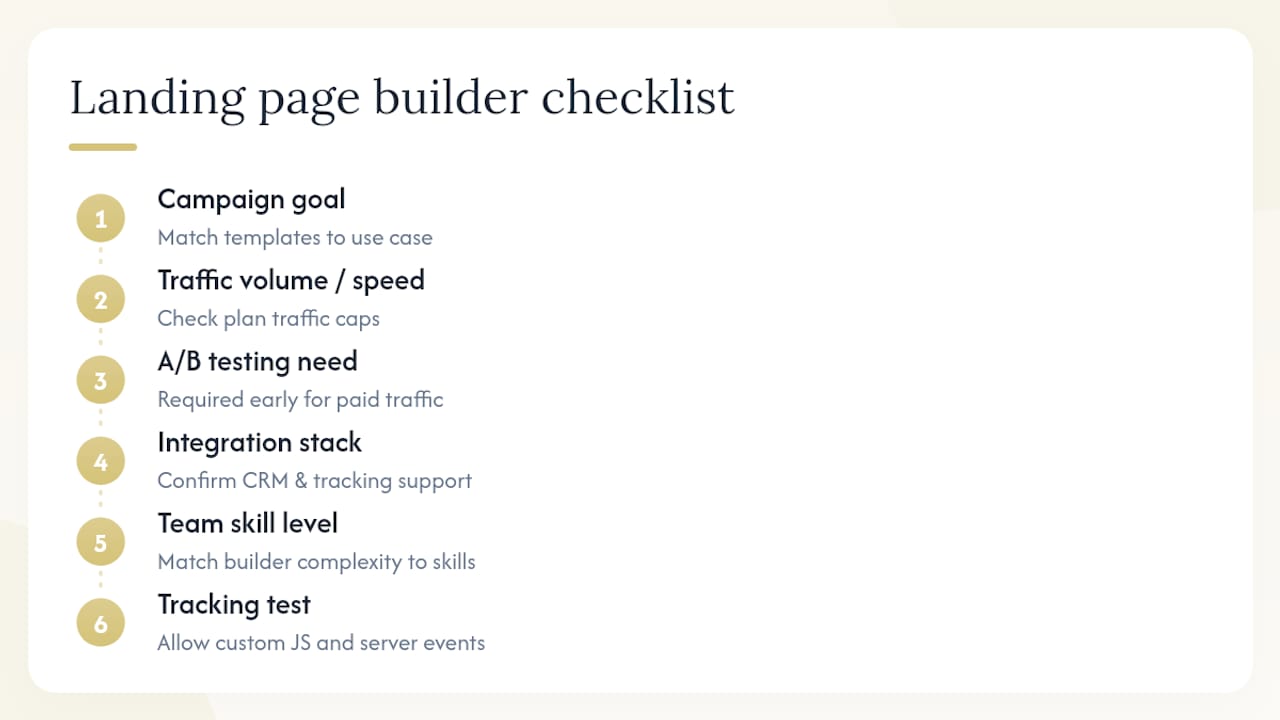
The decision comes down to five questions, answered honestly before you open a pricing page.
1. What is your campaign goal? Lead generation, product sales, and webinar registrations each have different conversion mechanics. A lead-gen page needs a strong form and fast load time. A product launch page needs social proof, video, and a clear CTA hierarchy. Match the tool’s template library to your actual use case.
2. How much traffic are you sending, and how fast? Unbounce and Instapage price by monthly unique visitors. If you’re running a big paid campaign, check the traffic caps on each plan before you commit. Leadpages charges a flat rate regardless of traffic, which is a real advantage for high-volume campaigns.
3. Do you need A/B testing, and when? If you’re spending on paid traffic, you need A/B testing from day one. Unbounce includes it on every paid plan. Leadpages gates it to Pro. HubSpot requires a $800/mo plan. Know this before you sign up, not after.
4. What does your integration stack look like? If your CRM is HubSpot, the native integration argument is strong. If you’re running a Zapier-connected stack, most tools on this list will work. The friction point is usually tracking: custom JavaScript injection for server-side pixels is available on Unbounce and Instapage but restricted on simpler builders.
5. What’s your team’s skill level? Elementor gives you the most design control but requires WordPress knowledge. Carrd and MailerLite are genuinely beginner-friendly. Unbounce and Instapage have learning curves worth budgeting time for.
Paid-ad funnels need fast load times, A/B testing, and clean pixel/tracking support. Unbounce, Instapage, and Swipe Pages are the natural fits.
Organic funnels (SEO-driven, content-led) benefit from SEO controls, flexible design, and CRM integration. HubSpot and Elementor work well here.
Ecommerce pages need native payment support or tight WooCommerce/Shopify integration. ClickFunnels and Elementor (with WooCommerce) are the strongest options.
Pro Tip: Before you finalize a tool, test whether it allows custom JavaScript injection and supports server-side tracking events. Many template-first builders block or limit this, which causes pixel drift on high-traffic campaigns and makes your conversion data unreliable. This single check eliminates several otherwise-appealing options for serious paid-ad work. For a deeper look at tracking accuracy across creator funnels, the Hyros vs Triple Whale comparison covers this in detail.
Which builder wins for your specific use case?
- Best for paid ads: — Unbounce. Smart Traffic routing and no-code A/B testing on every plan make it the default choice for teams spending on clicks.
- Best for creators and solopreneurs: — Leadpages for speed and AI drafts; GetResponse if you want email automation bundled in from day one.
- Best for enterprise personalization: — Instapage. AdMap and dynamic text replacement at scale, with team collaboration built in.
If Unbounce’s pricing is a stretch, Swipe Pages offers a comparable mobile-first feature set at $39/mo and is worth a direct trial. Zapier’s roundup consistently recommends building a sample page in each candidate tool before committing, and that advice holds: a 30-minute hands-on test reveals friction that no feature list will.
How we tested and compared these tools
Every tool on this list was evaluated against the same set of criteria, applied consistently.
- Integration friction: — How many clicks to connect a CRM, email platform, or ad pixel? Does it require Zapier, or is there a native connector?
| Metric | What we measured | Why it matters |
|---|---|---|
| Time to publish | Minutes from blank account to live page | Reduces time-to-live for paid campaigns |
| A/B test setup | Steps to launch a split test | Determines if testing is practical, not just available |
| Mobile performance | Lighthouse LCP / CLS scores | Directly affects Quality Score and conversion rate |
| Integration ease | Native vs. Zapier-only connectors | Affects tracking accuracy and data reliability |
| Custom JS support | Yes / restricted / no | Critical for server-side tracking and pixel accuracy |
| Cost per page | Plan cost / page limit | True value metric for agencies and high-volume teams |
Data sources included vendor documentation, product demos, platform help centers, aggregated user reviews on G2, and direct product trialing. Pricing reflects publicly listed rates as of 2026.
What’s changed in 2026: AI, global blocks, and auto-optimization
Three shifts have materially changed how you should evaluate landing page software this year.
AI page generation is now table stakes. Leadpages, Swipe Pages, Instapage, and Unbounce all offer some form of AI-assisted page creation. Leadpages’ workflow generates a complete draft in roughly 60 seconds. Swipe Pages’ Genie pulls brand assets directly from your URL. The practical result: time-to-live has dropped from hours to minutes for teams willing to use AI drafts as a starting point.
Smart Traffic-style auto-optimization changes the A/B testing calculus. Traditional A/B testing requires you to define variants, run traffic until you hit statistical significance, and then manually implement the winner. Unbounce’s Smart Traffic routes visitors to the best-performing variant automatically, without waiting for a declared winner. For marketing automation at scale, this continuous loop beats the manual test-and-iterate cycle.
Global blocks are now a must-have for agencies. If you manage more than 20 pages, a single component update (a new headline, a revised CTA, a compliance change) should propagate across every page instantly. Unbounce’s Global Scripts and Landingi’s smart blocks do this. Platforms that don’t support it force manual updates across every page, which is a real operational cost at scale.
According to Statista data on mobile traffic share, mobile devices account for a large and growing share of global website traffic. For landing pages running on paid social campaigns, that number is even higher. AMP support (Swipe Pages) and mobile-first templates are no longer optional for campaigns targeting Instagram or TikTok audiences.
- AI generation cuts time-to-live but introduces a new trade-off: speed vs. brand control. AI drafts need human review before going live on high-spend campaigns.
- Auto-optimization (Smart Traffic) reduces the statistical expertise required to run effective tests, but you still need enough traffic volume for the AI to learn.
- Global blocks are the single biggest operational advantage for agencies. If your tool doesn’t have them, you’re paying for that gap in manual labor.
How do these tools compare on customer support?
Support quality varies more than pricing pages suggest. Unbounce and Instapage offer live chat and dedicated onboarding on higher-tier plans, which matters when you’re troubleshooting a tracking issue at 11 PM before a campaign launch. Leadpages provides email and chat support across all paid plans, with response times that G2 reviewers generally rate as responsive for standard issues.
Landingi’s support quality is plan-dependent: users on the entry plan report slower response times, while agency-tier accounts get priority handling. HubSpot’s support infrastructure is extensive, but navigating it for a landing page-specific issue can mean bouncing between departments. ClickFunnels has a large community forum and knowledge base, which often resolves issues faster than waiting for a support ticket.
Carrd and MailerLite are self-serve by design. Documentation is solid, but live support is limited. For a creator publishing a simple opt-in page, that’s fine. For an agency running a $50,000 ad campaign, it’s not.
Mobile responsiveness: which builders get it right?
Every tool on this list claims mobile responsiveness, but the implementations differ significantly. Swipe Pages is the only builder here with native AMP support, which delivers near-instant load times on mobile by stripping non-essential elements. For campaigns running on Google Ads with mobile traffic, AMP pages can meaningfully improve Quality Score.
Unbounce and Instapage both offer mobile-specific editing views, letting you adjust layouts for small screens without affecting the desktop version. Leadpages uses responsive templates that adapt automatically, though the mobile editor is less granular than Unbounce’s. Elementor gives you full control over mobile breakpoints, but only if you’re comfortable with the WordPress environment.
MailerLite and Carrd use responsive templates that work well for simple pages. The limitation shows on complex layouts: multi-column sections and large hero images sometimes require manual adjustment to look right on smaller screens.
SEO capabilities: what each builder actually supports
Landing pages and SEO are often treated as separate concerns, but for organic funnels, on-page SEO controls matter. Most dedicated builders let you set custom meta titles, descriptions, and canonical URLs. Unbounce, Leadpages, and Instapage all support these basics. Swipe Pages adds structured data support, which helps for product and event pages.
Elementor is the strongest SEO option because it runs on WordPress, giving you full access to plugins like Yoast SEO or Rank Math. If organic search is a meaningful traffic source for your campaigns, WordPress plus Elementor is hard to beat on SEO depth.
HubSpot includes SEO recommendations natively within the page editor, flagging missing meta tags and suggesting keyword optimizations. For teams already in the HubSpot ecosystem, this removes the need for a separate SEO audit tool.
Carrd and MailerLite offer basic meta tag editing but limited structured data or advanced SEO controls. They’re not the right choice if organic traffic is a primary goal.
Do you own your pages, and can you export them?
This question matters more than most buyers realize until they try to switch tools. Most hosted landing page builders (Unbounce, Instapage, Leadpages, Swipe Pages) host your pages on their infrastructure. You own the content, but the pages live on their servers. If you cancel your subscription, your pages go offline.
Exporting is where the differences are sharpest. Unbounce allows HTML export on higher-tier plans. Instapage does not offer a clean HTML export, which creates real lock-in. Leadpages allows limited HTML export. Elementor, being WordPress-native, gives you full ownership: your content lives on your own server and is fully portable.
ClickFunnels pages are hosted on ClickFunnels’ infrastructure with no clean export path. Carrd pages are hosted by Carrd, but the simplicity of the pages means rebuilding them elsewhere is trivial. MailerLite pages are hosted by MailerLite, with no export option.
For agencies building pages on behalf of clients, this is a critical consideration. If the client ever wants to move their pages to their own hosting, Elementor is the only tool here that makes that straightforward.
What do real users say about these tools?
Across aggregated reviews on G2 and similar platforms, a few patterns emerge consistently.
Unbounce users praise the Smart Traffic feature and the flexibility of the editor, but frequently cite pricing as a pain point, particularly the traffic-based tier jumps. Instapage earns high marks for its collaboration tools and personalization depth, but the price point generates the most negative reviews among enterprise buyers who feel the value doesn’t justify the cost at lower traffic volumes.
Leadpages users consistently highlight ease of use and the speed of the AI builder as standout positives. The most common complaint is that A/B testing is locked to the Pro plan, which feels like an artificial gate for a feature that’s standard elsewhere. Swipe Pages has a smaller but enthusiastic user base, with mobile performance and AMP support cited most often as the reason buyers chose it over alternatives.
Landingi reviews are mixed on support quality but positive on template variety and agency-friendly features. HubSpot’s landing page reviews are generally positive among existing HubSpot users and negative among buyers who purchased it specifically for landing pages and found the editor limiting. MailerLite consistently earns strong reviews for value, with the free tier cited as a genuine differentiator for early-stage creators.
Key Takeaways
The best landing page builder for conversion-focused campaigns combines native A/B testing, fast page delivery, and AI-assisted optimization — Unbounce leads on all three for most U.S. marketers.
| Point | Details |
|---|---|
| A/B testing access varies by plan | Unbounce includes it on all paid plans; Leadpages gates it to Pro ($99/mo); HubSpot requires Professional ($800/mo). |
| AI generation cuts time-to-live | Leadpages generates a full page draft quickly; Swipe Pages extracts brand assets from your URL automatically. |
| Mobile performance is non-negotiable | Mobile devices account for a large and growing share of global web traffic, as reported by Statista; AMP support (Swipe Pages) and mobile-first editors are critical for social ad campaigns. |
| Page ownership varies significantly | Elementor (WordPress) gives full portability; Instapage offers no clean HTML export, creating real lock-in. |
| Money-plug handles the full launch stack | For creators who need more than a page builder, Money-plug manages product architecture, sales copy, ad ops, and tracking on a revenue-share basis. |
The feature list isn’t the real decision
Most landing page builder comparisons stop at features. That’s the wrong frame. The real question is whether the tool fits the workflow your team will actually use under pressure, at 11 PM before a campaign goes live.
Unbounce wins on paper for CRO-first campaigns. But if your team finds the editor unintuitive, they’ll default to Leadpages or MailerLite and skip the A/B testing entirely. A tool your team uses consistently beats a technically superior tool they avoid.
The second thing most comparisons miss: tracking integrity. A landing page that loads in 1.2 seconds but loses 30% of its conversion events to pixel drift is worse than a slightly slower page with clean server-side tracking. Before you commit to any builder, test whether it supports custom JavaScript injection and whether your ad pixels fire correctly on mobile. This single check eliminates several otherwise-appealing options for serious paid-ad work.
For agencies, the global blocks question is the one to ask first. If you’re managing 50+ pages and a compliance change requires updating a footer disclaimer, you want that to take 30 seconds, not three hours. Unbounce and Landingi handle this well. Most others don’t.
The lead generation strategies that actually move the needle aren’t about which builder you pick. They’re about what you put on the page and how fast you iterate. The builder is infrastructure. Treat it that way.
When a landing page builder isn’t enough
Every tool on this list gives you the infrastructure to publish a page. What they don’t give you is the audience research, the offer architecture, the sales copy, or the ad creative that makes the page convert. That’s the gap Money-plug fills.
Money-plug works with content creators and coaches on a pure revenue-share basis, meaning zero upfront cost. The agency handles everything from product architecture and pricing strategy to video sales letters, launch campaigns, and post-launch ad optimization. Creators who’ve partnered with Money-plug have generated over $500,000 in tracked revenue across seven launched programs, including one campaign that returned 18x on ad spend.
If you’re a creator with an engaged audience and a product idea, the right next step isn’t choosing between Unbounce and Leadpages. It’s deciding whether you want to build and manage the entire launch infrastructure yourself, or partner with a team that’s done it before on a model where they only win when you do.
See how Money-plug structures creator launches and whether the revenue-share model fits your situation.
Sources and further reading
- AI Landing Page Builder with A/B Testing & Heatmaps | Leadpages
- 22 Best Landing Page Builders (2026)
- The Best Landing Page Builder and CRO platform | Unbounce
- Best Landing Page Builder & Software - Create High-Converting Landing Pages | Instapage
- AI Landing Page Builder — Create High-Converting AI Landing Pages | Swipe Pages
- The 7 best landing page builders - Zapier
- Statista — Share of website traffic coming from mobile devices
- Instapage reviews | G2