Community Onboarding: A Step-by-Step Playbook
Community Onboarding: A Step-by-Step Playbook

Community onboarding is the process that turns a new member into an active one, and it succeeds or fails on a single question: did that person take one meaningful action in their first session? Not “did they join,” not “did they read the rules.” Did they post, react, RSVP, or fill out a profile. That’s the whole job.
Here’s what to do in the next hour, before you read another word of this guide:
- Pin a Start Here post that tells new members exactly what to do first.
- Add an introductions prompt (one question, not five) to your welcome channel.
- Turn on a personalized welcome DM or auto-message that links directly to that prompt.
Circle’s community onboarding guide frames onboarding as everything that happens between join and first meaningful action, and the Harvard Business Review’s research on small wins explains why that first action matters so much: visible progress, even tiny progress, is what keeps people moving. One guide citing Membersuite research found onboarding lifted retention from about 70% to 84%. If you want a partner who builds this kind of flow for a living, Money-plug does exactly that for creators launching paid communities.
Key Takeaways
Community onboarding succeeds when it drives one meaningful first action fast, backed by a mapped sequence, human follow-up, and metrics tracked from day one.
| Point | Details |
|---|---|
| Define success as activation | Measure the first meaningful action separately from signups, not registration alone. |
| Use a milestone-based sequence | Map Day 0, 48 hours, Day 3, Week 1, and Week 2 with one action each. |
| Keep the first ask tiny | A one-minute action, like a reaction or one-line intro, builds momentum better than a big request. |
| Add a human touch by day seven | A personal moderator message at the one-week mark repairs most onboarding gaps. |
| Get expert help building the flow | Money-plug designs onboarding sequences, copy, and automation for creators launching paid communities. |
Table of Contents
- Why Does Onboarding Matter So Much for Retention?
- What Onboarding Formats Actually Work?
- How Do You Design a 7 to 14 Day Onboarding Sequence?
- What Templates Can You Use Right Now?
- How Do You Set Up Onboarding Without Missing Anything?
- What Should You Measure After Launch?
- What Mistakes Kill Onboarding, and How Do You Fix Them?
- What Does a Real Onboarding Fix Look Like?
- What’s the Right Tone for Onboarding Messages?
- How Can Money-plug Help You Build This?
- Where Can You Learn More About Onboarding?
- Frequently Asked Questions
- Sources
Why Does Onboarding Matter So Much for Retention?
A weak first session doesn’t just produce a quiet member. It produces a member who leaves and never tells you why. Onboarding is the fix, and its effects show up in three places: retention, support load, and how fast people post for the first time.
Communities that build a real onboarding flow see fewer members drop off in the first week, fewer repetitive “how do I…” questions in support channels, and a shorter gap between signup and that first post. The 70% to 84% retention shift tied to structured onboarding isn’t a rounding error. It’s the difference between a community that compounds and one that constantly refills a leaky bucket.
Three numbers worth tracking from day one:
- 7-day activation rate: the percentage of new members who complete one meaningful action within a week.
- Time-to-first-post: how long it takes a typical newcomer to post, comment, or react for the first time.
- 30/90-day retention: whether members who activate early are still around a month or a quarter later.
Skip onboarding and you’re not saving time. You’re just moving the cost to your support queue and your churn report.
What Onboarding Formats Actually Work?
There’s no single right format. The right one depends on your community’s size, your platform’s features, and how much staff time you actually have. Most communities end up mixing two or three of these:
- Start Here space: A pinned, evergreen page or channel that explains the community’s purpose, rules, and first steps. Works for every community size and needs almost no maintenance.
- Guided onboarding wizard: A platform-native flow (Discord’s Community Onboarding is the clearest example) that asks questions and assigns roles automatically. Best when you have hundreds or thousands of members and can’t greet everyone by hand.
- Onboarding email sequence: A short series of automated emails triggered by signup. Ideal for communities that live partly outside chat, like membership sites or paid programs.
- Intro threads or channels: A dedicated space where newcomers post a short bio. Works well for mid-sized communities where members genuinely read each other’s posts.
- Cohort-based onboarding: Groups of new members go through onboarding together on a schedule. This format shines in learning communities and paid cohort programs, where peer accountability drives early engagement.
- Buddy programs: Pairing a newcomer with an established member. Best reserved for smaller or higher-touch communities where you can actually sustain the matching.
Small, high-touch communities lean on buddy systems and manual DMs. Large, fast-growing ones lean on automation and platform-native wizards. Most real communities land somewhere in between.
How Do You Design a 7 to 14 Day Onboarding Sequence?
Build the sequence around milestones, not calendar days. Each milestone gets exactly one desired action. Trying to accomplish three things in a single message is how onboarding sequences die.
Start by mapping triggers. Signup should trigger a welcome message. Role selection (if your platform supports it) should trigger channel access. An event RSVP should trigger a reminder sequence. Some of this can run on automation; some, especially early manual outreach in smaller communities, needs a human behind it.
| Milestone | Desired action | Trigger |
|---|---|---|
| Day 0 | Complete profile or react to welcome post | Signup |
| 48 hours | Post one introduction | Automated nudge or DM |
| Day 3 | Visit a key resource or channel | Email or in-platform message |
| Week 1 | Attend or RSVP to an event | Event calendar trigger |
| Week 2 | Contribute a comment, answer, or reaction | Behavioral nudge based on inactivity |
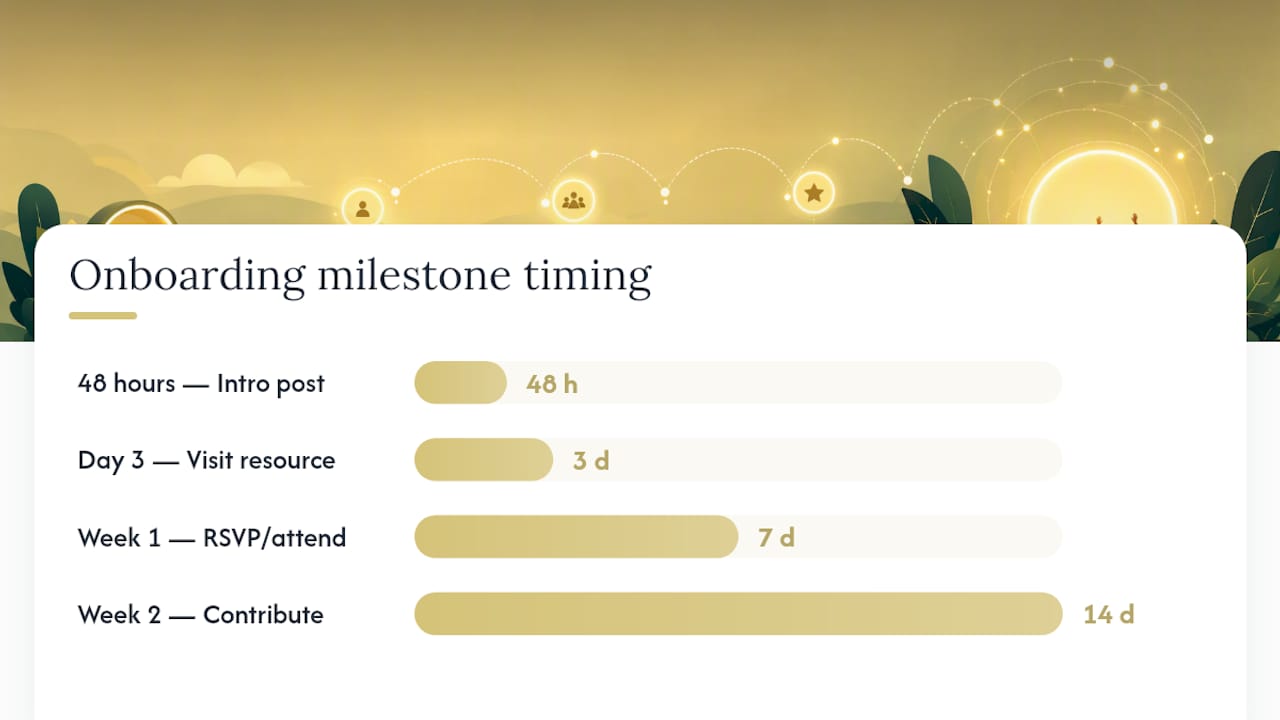
Two things break this sequence more than anything else: asking for too much in the Day 0 message, and letting Week 1 pass with zero human contact. Automate the reminders. Don’t automate the entire relationship.
Pro Tip: Make the very first requested action something completable in under sixty seconds, like reacting to a post or answering a one-line poll. Harvard Business Review’s research on small wins shows that visible, low-effort progress is what actually builds momentum, not big asks.
What Templates Can You Use Right Now?
Copy these directly and adjust the tone to match your community.
Welcome post templates
- Concise version: “Welcome to [Community Name]! Drop a one-line intro below and check the pinned post for how things work here.”
- Cohort version: “Your cohort starts [date]. Introduce yourself in this thread, then head to the Week 1 channel for your first task.”
- Professional community version: “Glad you’re here. This group exists to help members with [specific goal]. Start by sharing your role and what you’re hoping to get out of it.”
Introduction prompts
- “What brought you here, and what’s one thing you’re working on right now?”
- “Name, role, and one resource you’d love to find in this community.”
- “Tell us your win from this week, big or small.”
Three-message onboarding email sequence (spaced two to four days apart, per Zoho’s onboarding email guidance):
- Day 0, Welcome: Confirm signup, state one clear next step (join the Start Here channel or complete a profile).
- Day 3, Value highlight: Point to the single most useful resource or feature, with one small action attached.
- Day 7, Invite: Ask them to RSVP to an event or connect with a buddy or moderator.
Moderator DM template: “Hey [Name], saw you joined this week. What are you hoping to get out of the community? Happy to point you to the right channel.”
Pro Tip: Automate the Day 0 and Day 3 emails, but keep the Day 7 message manual if your team can manage it. A real person reaching out at the one-week mark converts far better than another automated nudge.
How Do You Set Up Onboarding Without Missing Anything?
Before launch, run through this checklist:
- Confirm the Start Here space is pinned and visible to every new member, not just existing ones.
- Test every automation end to end, including edge cases like a member who skips role selection.
- Draft welcome content before your next member arrives, not after.
- Assign at least one moderator to watch new-member activity daily.
- Wire your activation and retention metrics into a dashboard before launch, not after you notice a problem.
If you’re running a Discord server, Discord’s Community Onboarding feature lets you build a question-based flow that assigns roles and unlocks channels automatically. Test it from a brand-new account, not your admin account, since role-based channel visibility often behaves differently than expected.
Pro Tip: If members report they “can’t find anything,” the usual culprit is a welcome flow that fires but never actually unlocks the channels it promises. Test the full path as a fresh account before you trust it.
What Should You Measure After Launch?
Track five numbers on repeat: activation rate, time-to-first-post, 7/30/90-day retention, event RSVP rate, and support ticket volume tied to “how do I” questions. Gradual Community’s onboarding design guidance makes a sharp point here: activation and registration are not the same metric, and treating them as one hides your real problem.
Run a lightweight iteration loop:
- Weekly: Quick-check activation rate and time-to-first-post for anything drifting the wrong way.
- Monthly: Deeper review, including A/B tests on message copy, timing, and how hard that first action actually is.
- Ongoing: Ask three or four recent newcomers directly what almost made them leave. Their answers beat any dashboard.
Treat the sequence as a living system, not a one-time setup.
What Mistakes Kill Onboarding, and How Do You Fix Them?
The most common failure is asking too much, too soon: a five-question survey, three rules to accept, and a request to introduce yourself, all in the first message. Fix it by splitting that into separate, smaller prompts spread across days, not minutes.
Vague guidelines are the second killer. If your rules read like a legal disclaimer, members skim past them and break norms they never understood. Write guidelines in plain language, the way you’d explain them out loud.
The third failure is silence. No human ever reaches out, so the member assumes nobody noticed them, and they don’t come back. The fix is cheap: a moderator spotlighting first posts, or a short personal reply within 48 hours, repairs most onboarding gaps before they become churn.
What Does a Real Onboarding Fix Look Like?
One coaching community we worked with had a familiar problem: strong signups, weak follow-through. New members joined, skimmed a long welcome message, and vanished. No Start Here space existed, and the only “onboarding” was a generic auto-reply.
The fix was small on purpose: a pinned Start Here post, a one-question intro prompt, and a three-message email sequence spaced across the first week, mirroring the structure recommended by onboarding email best practices. Within a month, first-week posting activity roughly doubled, and moderators reported far fewer repeat questions in support channels.
What to copy: one clear first action, spaced follow-ups, and a human touch by day seven. What to avoid: a single long welcome message that tries to explain everything at once.
What’s the Right Tone for Onboarding Messages?
The best onboarding doesn’t read like policy. It reads like a person talking to another person, because that’s what actually gets someone to post back.
Think of onboarding like hosting a dinner party. You greet people at the door, give them a quick tour of the house, and introduce them to at least one other guest before you disappear into the kitchen. Nobody hands a new guest a laundry list of house rules and walks away. Good onboarding does the same thing: welcome, orient, connect, and only then step back.

One last thing worth saying plainly: your onboarding tone has to match what your moderation team can actually sustain. A warm, high-touch welcome that no one follows up on is worse than a simpler one you can actually deliver every time.
How Can Money-plug Help You Build This?
Designing a working onboarding sequence takes more than a template. It takes someone who’s mapped triggers, written the copy, and wired the automation before, and knows where these flows usually break. Money-plug builds exactly this for creators launching paid communities and membership programs, including the onboarding flow itself, the welcome and email copy, and the automation that connects signup to first action.
If you’re a creator or community leader planning a paid launch and want the onboarding sequence built alongside your product architecture and sales copy rather than bolted on afterward, Money-plug can scope that work with you on a revenue-share basis, with no upfront cost. Reach out through the Money-plug site to talk through your launch timeline and where onboarding fits into it.
Where Can You Learn More About Onboarding?
- Circle’s guide to building a community onboarding experience
- Discord’s official Community Onboarding FAQ
- Community guidelines examples for friendly, respectful spaces
- Gradual Community’s onboarding design resource
- Examples of community gathering spaces that work
Frequently Asked Questions
What is community onboarding, in one sentence? It’s the process that starts when a member joins and ends when they take a meaningful first action, like posting, RSVPing, or completing a profile.
How long should an onboarding sequence run? Most effective sequences run 7 to 14 days, with the heaviest touchpoints in the first 72 hours and a lighter follow-up through week two.
Do I need email if my community lives on Discord or Slack? Not always. In-platform nudges often work fine for chat-native communities, but email adds reach for members who go quiet on the platform itself.
What’s the single biggest onboarding mistake? Asking for too much in the first message. Split a long checklist into small, spaced actions instead.
How do I measure if onboarding is working? Track activation rate, time-to-first-post, and 30/90-day retention. If activation improves but retention doesn’t, the problem lives further down the funnel.
Sources
- How to build your community onboarding experience: tips, examples & more
- Community Onboarding: The Ultimate Guide to Welcoming New Members | Jatra Community
- Community Onboarding FAQ
- Onboarding email guide and templates