WhatsApp Broadcast Marketing for Small Businesses
WhatsApp Broadcast Marketing for Small Businesses

Most U.S. small businesses should start with the WhatsApp Business App if they have fewer than 256 opted-in contacts who have already saved their number, and move to the WhatsApp Business API (accessed through a Business Solution Provider, or BSP) the moment they need to reach beyond that ceiling, automate replies, or contact people who haven’t saved their number. The WhatsApp templates overview from Meta lays out both paths clearly: the free app for small-scale, manual sends; the API for anything that needs to scale.
Pick your path in under 60 seconds:
- Monthly message volume under 256 contacts and all contacts have saved your number? WhatsApp Business App is enough for now.
- Need to reach contacts who haven’t saved your number? You need the API.
- Want automated replies, CRM sync, or scheduled campaigns? You need the API.
- Selling at volume, running paid ads with Click-to-WhatsApp, or managing multiple agents? API only.
The WhatsApp Help Center confirms that the Business App’s broadcast feature is designed for small, personal-scale outreach, not high-volume marketing. If any of the last three bullets above describe your situation, skip ahead to the API setup section.
Key Takeaways
WhatsApp broadcast marketing works best when you match the right technical path to your list size, automate opt-in collection from day one, and treat every message as a private conversation rather than a bulk send.
| Point | Details |
|---|---|
| Pick your path first | Under 256 opted-in contacts with saved numbers: use the Business App. Any scale beyond that requires the API via a BSP. |
| Opt-in is non-negotiable | Record timestamp, source, and campaign ID for every contact before sending any marketing template. |
| Templates drive everything | Match template category to content: Marketing for promotions, Utility for transactional messages only. |
| Pilot before you scale | Send to 50–100 high-intent contacts first; a delivery rate below 90% means your list needs cleaning before a full send. |
| Money-plug handles the full stack | From opt-in funnel design to BSP onboarding and campaign measurement, Money-plug manages the setup on a revenue-share basis. |
Table of Contents
- What is a WhatsApp broadcast and how is it different from a group?
- What are the real limits of the WhatsApp Business App for marketing?
- WhatsApp Business App vs WhatsApp Business API: which path fits your business?
- How does the 24-hour window work, and when do you need a template?
- How to collect opt-ins and stay compliant in the U.S.
- How to set up broadcasts in the WhatsApp Business App
- How to onboard to the WhatsApp Business API via a BSP
- Ready-to-use WhatsApp broadcast templates you can adapt today
- How to measure broadcast performance and estimate campaign costs
- Best practices and mistakes that damage your account health
- A 7-step campaign flow for a compliant product-launch broadcast
- What actually works for SMBs starting with WhatsApp broadcasts
- When outsourcing your WhatsApp broadcast campaigns makes sense
- Sources
What is a WhatsApp broadcast and how is it different from a group?
A WhatsApp broadcast sends one message to multiple recipients, but each person receives it as a private, one-on-one chat. Nobody on the list sees who else got the message. That’s the key distinction from a WhatsApp group, where every member can see all replies and every other participant.
Here’s how the three message types compare:
- Broadcast: One sender, many recipients, each receives a private copy. Replies come back to your inbox as individual conversations.
- Group: All members see all messages and all replies. Good for community discussion, bad for marketing.
- 1:1 message: Single sender to a single recipient. Full conversation context, no scale.
From a marketing standpoint, the broadcast format is the right one. Recipients feel like you’re talking directly to them, which is why WhatsApp messages tend to get read at rates that email marketers can only dream about. A local yoga studio sending a small appointment reminder, for example, gets 50 private nudges rather than a group thread where clients start replying to each other and the message gets buried.
Inside the WhatsApp Business App, broadcasts live under New Broadcast in the chat list. You build a list, type your message, and send. Each recipient sees it arrive in their regular chat with your business number, with no indication that 49 other people got the same message.
What are the real limits of the WhatsApp Business App for marketing?
The contact limit per broadcast list is the headline constraint, but the saved-number requirement is the one that quietly kills most campaigns. If a recipient hasn’t saved your business number in their phone contacts, the message simply doesn’t arrive. No error, no bounce notification. It just disappears. This is the most common reason businesses think their broadcasts are working when they’re not.
The quality rating risk is equally serious. When recipients report your messages as spam or block your number, Meta’s system registers those signals and lowers your account’s quality rating. A yellow rating reduces your messaging limits. A red rating can suspend outbound messaging entirely. The WhatsApp Help Center’s broadcast documentation describes how the Business App converts broadcasts to marketing messages and notes the UI behaviors tied to this quality system.
A few specific failure modes to watch for:
- Sending to contacts who opted in verbally but never saved your number (messages silently fail)
- Reusing the same broadcast list for every campaign without pruning inactive contacts
- Sending too frequently, which spikes block rates even among people who originally wanted your messages
- Ignoring replies, which signals low engagement and reduces perceived legitimacy
Pro Tip: If a noticeable portion of your broadcast list consists of contacts who may not have your number saved, you’re already in territory where the Business App will underperform. That’s the practical signal to start evaluating the API, not the 256-contact ceiling.
WhatsApp Business App vs WhatsApp Business API: which path fits your business?
The short answer: the Business App is a free, manual tool built for small local businesses. The API is a developer-grade channel built for businesses that need to send at scale, automate workflows, and maintain compliance records.
Here’s how the two paths map to real SMB needs:
| Dimension | WhatsApp Business App | WhatsApp Business API (via BSP) |
|---|---|---|
| Recipient limit per send | 256 contacts per broadcast list | Effectively unlimited (subject to tier and quality rating) |
| Reach unsaved contacts | No — recipient must save your number | Yes — with documented opt-in |
| Cost model | Free | Meta template fees + BSP platform fee |
| Automation & personalization | Manual only; no variables or scheduling | Full automation, CRM variables, scheduled sends |
| Template governance | Basic in-app marketing message conversion | Meta-reviewed and approved templates required |
| Analytics & delivery reporting | Read receipts only (manual tracking) | Delivery, read, click, and conversion reporting via BSP dashboard |
Onboarding complexity: The Business App takes about 10 minutes to set up. The API path involves Meta Business Manager verification, phone number registration, template submission and approval, and BSP integration, which typically takes one to three weeks end-to-end.
Likely monthly cost: The Business App is free. API costs depend on message volume, template category (Marketing templates cost more than Utility), and your BSP’s platform fee. Meta’s pricing page confirms that costs vary by recipient country and template category, so a U.S.-to-U.S. campaign will have a different per-message rate than an international one.
How replies are handled: In the Business App, replies land in your chat inbox and you respond manually. With the API, replies trigger webhooks that route to your BSP dashboard, a CRM, or an automated chatbot flow. For businesses with high reply volume, that automation is what makes the channel manageable.
The BSPs most commonly evaluated by U.S. SMBs are Infobip, Twilio, MessageBird, and Sinch. Each connects to Meta’s API and adds its own layer of template management, analytics, and support. What to look for when comparing them: transparent per-message pricing, a template submission interface, inbound message routing, webhook reliability, and U.S.-based support.
How does the 24-hour window work, and when do you need a template?
The 24-hour customer-service window is one of the most misunderstood rules in WhatsApp business messaging. Here’s how it actually works.
When a customer sends your business a message, a 24-hour window opens. Inside that window, you can reply with any free-form text. No template required. The window resets every time the customer sends another message. Once 24 hours pass without a customer message, the window closes, and you can only send pre-approved message templates to re-engage them.
For marketing broadcasts, the window is almost always closed. You’re initiating contact, not responding to a customer inquiry. That means every outbound marketing broadcast sent via the API requires a Meta-approved template.
Template categories and why they matter:
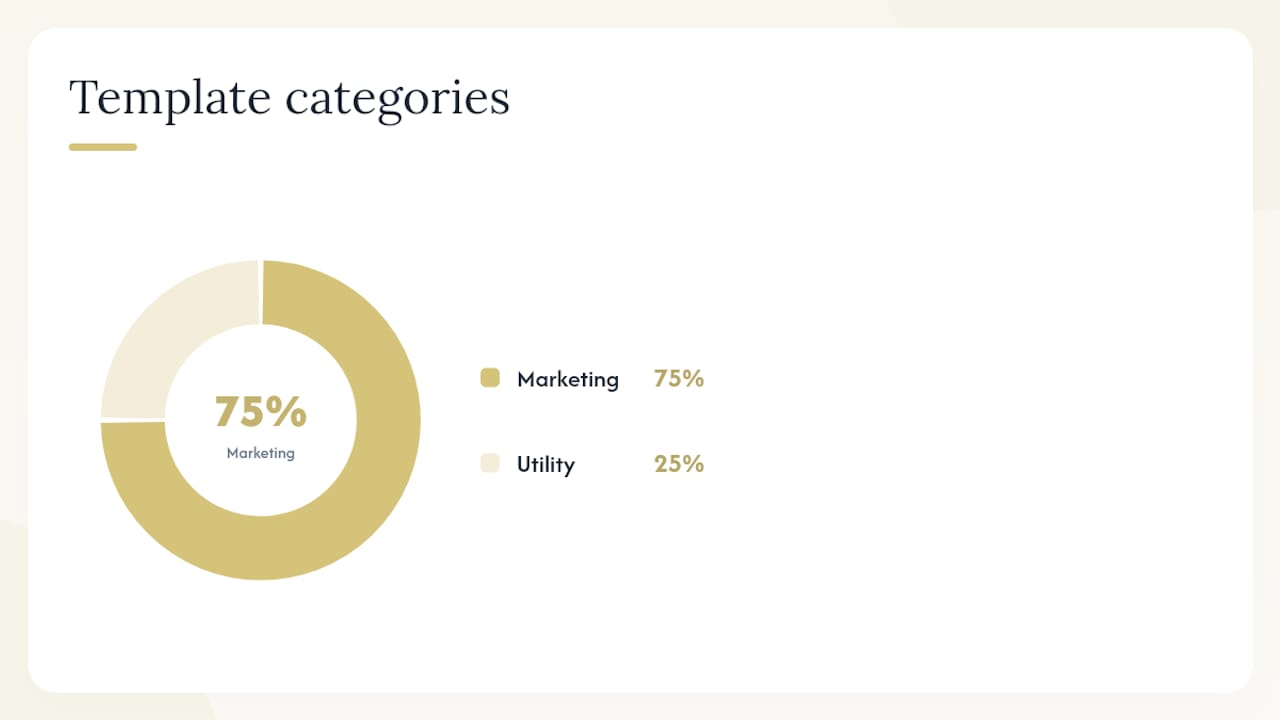
- Marketing templates: Promotions, product launches, back-in-stock alerts, VIP offers. Higher cost per message. Require explicit opt-in. Most broadcast campaigns use these.
- Utility templates: Order confirmations, shipping updates, appointment reminders, payment receipts. Lower cost. Must be strictly transactional. Putting promotional language in a Utility template is a fast route to rejection and policy flags.
- Authentication templates: One-time passwords and verification codes. Tightly controlled format.
Checklist for designing templates that pass Meta review:
- Keep the message under 1,024 characters
- Use variables (like
{{1}}for a customer name) consistently and fill them with real example values when submitting - One CTA button maximum per template for best approval rates
- No promotional language in Utility templates (no “discount,” “offer,” or “limited time” in a shipping update)
- No vague or misleading variable placeholders
- Match the template category to the actual content, not the cheaper category
A common mistake: submitting an abandoned-cart recovery message as a Utility template to save on per-message costs. Meta’s categorization system flags this, and the template gets rejected or re-categorized automatically.
How to collect opt-ins and stay compliant in the U.S.
Explicit, recorded opt-in is required before you send any marketing template. Not implied consent, not a prior purchase relationship. Documented, specific consent to receive WhatsApp marketing messages from your business.
Meta’s opt-in policy is direct: importing scraped lists or sending promotional templates to contacts who haven’t explicitly agreed to receive them is grounds for account suspension.
Defensible opt-in sources for U.S. businesses:
- Website signup form with a WhatsApp-specific checkbox and timestamp recorded in your CRM
- Click-to-WhatsApp ad (the user initiates the conversation, which counts as opt-in)
- POS receipt opt-in with a written or digital confirmation
- Post-purchase email with a “Text me on WhatsApp” confirmation link
- In-store QR code that opens a pre-filled opt-in message
Sample opt-in microcopy for a website form:
What to record for each opt-in:
- Contact’s phone number (E.164 format)
- Timestamp of consent
- Source (web form URL, ad ID, POS terminal ID)
- Campaign or list ID the contact was added to
- IP address or device ID where available
On U.S. compliance: the Telephone Consumer Protection Act (TCPA) was written for SMS and voice calls, and its direct applicability to WhatsApp is unsettled. That said, using documented, specific consent for every contact is the practical standard that reduces legal exposure and satisfies Meta’s own policy simultaneously.
Pro Tip: Store opt-in records in your CRM with a dedicated field for “WhatsApp consent source.” If Meta or a regulator ever asks for proof, you need to produce a timestamped record, not a spreadsheet you assembled after the fact.
How to set up broadcasts in the WhatsApp Business App
Use this path when you have fewer than 256 opted-in contacts and you’re confident they’ve all saved your number.
- Install and verify the WhatsApp Business App on your business phone. Set up your business profile (name, category, address, hours).
- Create contact labels (e.g., “VIP Customers,” “New Leads,” “Repeat Buyers”) to organize your opted-in contacts before building broadcast lists.
- Build a broadcast list: Tap the menu icon, select “New Broadcast,” and add contacts from your labeled groups. You can add up to 256.
- Compose your message. Keep it short, personal, and include one clear call to action. If the app prompts you to convert it to a marketing message, follow the prompt — this is the feature the WhatsApp Help Center documents for in-app broadcast marketing.
- Send and monitor replies. Each reply arrives as an individual conversation. Respond promptly — engagement signals matter for your quality rating.
- Track manually. Check read receipts (double blue ticks) to gauge delivery. Note who replied and who didn’t for list hygiene.
Troubleshooting silent delivery failures: If a contact hasn’t saved your number, the message won’t deliver and you won’t see a delivery tick. The fix is to ask new contacts to save your number at the point of sale or in your opt-in confirmation message. Something as simple as “Save this number to receive updates from us on WhatsApp” in your welcome email solves most of this.
Pro Tip: At checkout or on your receipt, add a line like: “Want order updates on WhatsApp? Save our number: [number] and send us a message saying ‘Yes.’” That one step handles both the opt-in and the saved-number requirement at once.
How to onboard to the WhatsApp Business API via a BSP
The API path is necessary when you need scale, template-based outreach, automation, or the ability to reach contacts who haven’t saved your number.
- Create and verify a Meta Business Account at business.facebook.com. You’ll need a legal business name, a business email, and a phone number not already registered to a WhatsApp account.
- Choose a BSP. Evaluate Infobip, Twilio, MessageBird, and Sinch based on: pricing transparency, template submission UI, inbound message routing, webhook reliability, and quality of U.S. support. Request a demo from at least two before committing.
- Register your phone number through your chosen BSP’s onboarding flow. The number goes through Meta’s phone verification process. Expect 24–72 hours for approval.
- Design and submit message templates through your BSP’s template manager. Use real example variable values when submitting. Expect at least one revision cycle for new or complex templates. Approval typically takes a few hours to a few business days.
- Integrate with your CRM. Map your opt-in contact records to the BSP’s contact list. Set up webhook endpoints to receive inbound replies and route them to the right agent or automation flow.
- Define opt-in capture points. Confirm that every contact in your send list has a recorded opt-in before the first campaign goes out.
- Run a test campaign with 20–50 internal or highly engaged contacts before any full-scale send. Confirm delivery, template rendering, button functionality, and reply routing.
Common setup issues and fixes:
- Business Manager verification stuck: Upload a utility bill or bank statement matching your registered business address. Meta’s support team can manually review if automated verification stalls.
- Template rejected: Read the rejection reason carefully. “Policy violation” usually means promotional language in a Utility template. “Formatting issue” usually means inconsistent variable syntax. Revise and resubmit; most templates pass on the second attempt.
- Missing webhook events: Confirm your webhook URL is publicly accessible (not localhost), uses HTTPS, and returns a 200 response within five seconds. Most BSPs have a webhook test tool in their dashboard.
- Reply volume overwhelming your inbox: Set up an automated first-response template that acknowledges the message and routes to a queue. This buys your team time without leaving customers waiting.
Ready-to-use WhatsApp broadcast templates you can adapt today
Short messages with one CTA and a personalization variable consistently outperform longer, multi-offer messages, a pattern Sinch’s template library demonstrates across multiple industries. Here are eight templates you can adapt and submit to Meta.
1. Product launch (Marketing) Why it works: Name variable creates a personal feel. Single link CTA. Opt-out included. Short enough to read in five seconds.
2. Back-in-stock alert (Marketing) Why it works: Urgency without fake scarcity. No discount needed. The product’s track record does the selling.
3. Abandoned cart recovery (Marketing) Why it works: Opens a conversation rather than just pushing a link. The reply invitation improves engagement signals.
4. Appointment reminder (Utility) Why it works: Strictly transactional. No promotional language. Confirmation reply creates a useful engagement signal.
5. Reorder/upsell (Marketing) Why it works: Timing-based personalization makes it feel relevant, not random.
6. VIP early access (Marketing) Why it works: Exclusivity framing increases click rate. No discount required.
7. Post-purchase follow-up (Utility) Why it works: Pure Utility. Customers expect this. High open rate with zero risk of policy flags.
8. Feedback request (Marketing) Why it works: Button CTA reduces friction. Short ask. Generates social proof.
Common rejection reasons and fixes:
- Variable placeholder left empty in the sample submission: always fill
{{1}}with a real example value like “Sarah” - Promotional language in a Utility template: move the message to a Marketing template instead of trying to reclassify the content
- Multiple CTAs: reduce to one button or one link per template
- Vague opt-out language: use “Reply STOP to opt out” verbatim
Pro Tip: Submit templates in batches of three to five at a time. If one gets rejected, you still have approved templates ready to send while you revise. Never go into a campaign with only one template in the queue.
How to measure broadcast performance and estimate campaign costs
The three metrics that actually tell you whether a campaign worked are delivery rate, reply or click-through rate, and conversion rate tied to the broadcast CTA.
What to track and where:
- Delivery rate: Percentage of sent messages that reached the recipient’s device. In the Business App, this is blue ticks. In an API/BSP setup, it’s a dashboard metric. Anything below 90% signals a list quality problem.
- Reply or click-through rate: Replies in the Business App (manual count). Button click-through rate in API campaigns (tracked by BSP). This is your engagement proxy.
- Conversion rate: Link clicks that result in a purchase, booking, or form completion. Requires UTM parameters on your CTA link and a connected analytics tool like Google Analytics 4.
Cost structure for a U.S. campaign:
Meta’s pricing documentation confirms that template costs vary by category and recipient country. Marketing templates cost more per message than Utility templates. On top of Meta’s per-message fee, your BSP charges a platform fee, either per message or as a monthly subscription.
For a rough illustration: if a Marketing template costs $0.025 per message (a plausible U.S.-market estimate based on Meta’s published tier structure, though actual rates vary and should be confirmed with your BSP), a 1,000-contact campaign costs approximately $25 in Meta fees alone, plus your BSP’s margin. The math on well-segmented WhatsApp campaigns tends to be favorable compared to paid social.
Breakeven formula:
Breakeven conversions = Total campaign cost ÷ Revenue per conversion
If your campaign costs $50 total and your product earns $50 per sale, you need exactly one conversion to break even. Every conversion after that is profit.
Campaigns that consistently earn the best ROI: reorder prompts to existing customers, abandoned cart recovery, and VIP early access offers. Cold prospecting via broadcast performs worst and carries the highest quality-rating risk.
Best practices and mistakes that damage your account health
The single most important principle in WhatsApp broadcast marketing is this: treat it like a private conversation, not a bulk email blast. The moment recipients feel like they’re on a list, block rates climb and your quality rating drops.
Six practices that protect long-term deliverability:
- Strict opt-in only. Never add a contact who hasn’t explicitly agreed to receive WhatsApp messages from you.
- Segment before you send. A back-in-stock alert for running shoes should go to customers who bought running gear, not your entire list.
- Personalize every message. At minimum, use the recipient’s first name. Better: reference their last purchase or behavior.
- Cap frequency. Two to four marketing messages per month is a reasonable ceiling for most businesses. More than that, and block rates start climbing.
- Process opt-outs in real time. When someone replies STOP, remove them from all lists immediately. Delayed opt-out processing is both a policy violation and a quality-rating risk.
- Monitor your quality rating weekly. A drop from green to yellow is a warning. Green to red means your sending limits are already restricted.
Mistakes that tank quality scores fast:
- Sending to scraped or purchased lists
- Using a Utility template for promotional content to save on per-message costs
- Sending the same message to the same list more than once in a short window
- Ignoring inbound replies (low engagement signals hurt your standing)
- Sending at 2 AM local time for your recipients
Handling inbound replies at scale:
Set up a triage rule in your BSP or CRM: replies containing “STOP,” “unsubscribe,” or “no” trigger immediate opt-out processing. Replies containing questions route to a human agent queue. All other replies get an automated acknowledgment within five minutes, followed by human follow-up within two hours during business hours.
Pro Tip: *Before any full-scale broadcast, send to a pilot group of 50–100 of your most engaged contacts first.
A 7-step campaign flow for a compliant product-launch broadcast
Run a staged flow: capture opt-ins, segment high-intent contacts, send a pre-launch tease, execute the main broadcast, and handle replies with a mix of automation and human follow-up.
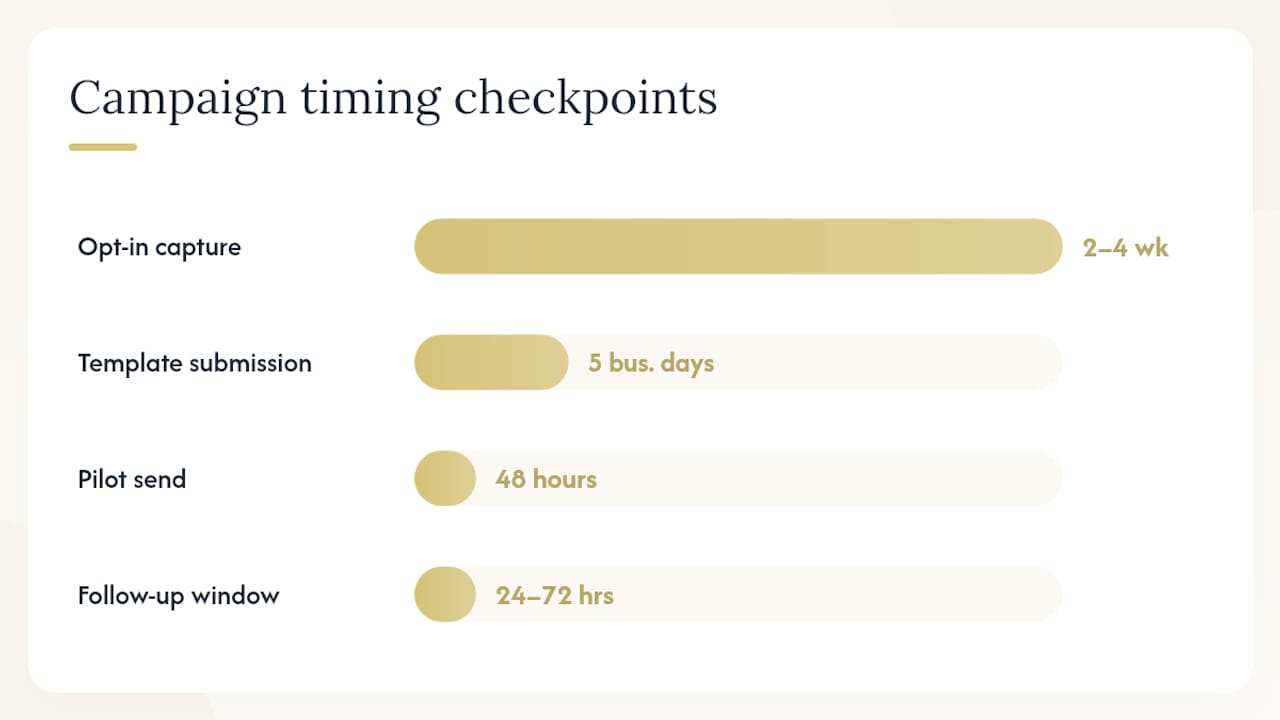
- Opt-in capture (2–4 weeks before launch). Add a WhatsApp opt-in checkbox to your product waitlist page. Record timestamp, source URL, and campaign ID for every signup.
- Segment your list. Pull contacts who have purchased in the same category before, or who clicked a related email in the last 90 days. This is your high-intent segment. Keep your general list separate.
- Create and submit your templates. You need at least two: a pre-launch tease (Marketing) and the launch broadcast (Marketing). Submit both at least five business days before your launch date to allow for approval and one revision cycle.
- Pilot send (48 hours before launch). Send to 50–100 contacts from your high-intent segment. Check delivery rate, click-through rate, and any blocks or reports. If quality metrics look healthy, proceed.
Pre-send validation checklist:
- Opt-in audit: every contact on the list has a recorded, timestamped consent
- Template category matches content (Marketing for promotional, Utility for transactional)
- CTA link is live and UTM-tagged
- Opt-out mechanism is functional and routes to real-time removal
- Webhook is receiving test events correctly
- Full broadcast (launch day). Send to your full segmented list. Stagger sends if your BSP supports it, which reduces simultaneous reply volume and gives your team time to respond.
- Inbound reply handling. Automated first response acknowledges the message within 60 seconds. STOP replies trigger immediate opt-out. Questions route to a human agent. Purchase-intent replies (e.g., “How do I order?”) get a direct link and a follow-up from an agent within two hours.
- Follow-up and measurement (24–72 hours post-launch). Send a follow-up template to contacts who clicked but didn’t convert. Pull your delivery, click-through, and conversion data from your BSP dashboard. Calculate ROI against the breakeven formula. Document what worked for the next campaign.
If reply volume overwhelms your team: Activate a holding template (“Thanks for your message! We’re handling a high volume right now and will get back to you within [X] hours.”) and prioritize purchase-intent replies first. If webhooks stop firing, check your endpoint’s response time and confirm your BSP’s webhook retry policy.
What actually works for SMBs starting with WhatsApp broadcasts
Most SMBs overthink the technology and underthink the list. The businesses that get the best results from WhatsApp broadcast marketing aren’t the ones with the most sophisticated BSP setup. They’re the ones with clean, well-segmented opt-in lists and messages that feel like they came from a person, not a marketing department.
The most common mistake I see is treating the first campaign as a test of the channel rather than a test of the list. If your opt-in process was sloppy, no template will save you. Start with 100 genuinely opted-in contacts, send one well-crafted message, and measure what happens. That pilot tells you more than any benchmark.
For most SMBs, two to three broadcast campaigns per month is the right cadence. More than that, and you’re training your audience to ignore you or block you. Less than once a month, and the channel loses its immediacy advantage.
When to bring in external help: if you’re spending more than a few hours per week managing templates, replies, and opt-in records, or if your BSP onboarding has stalled at the Meta verification stage, that’s the point where an agency or specialist pays for itself quickly.
When outsourcing your WhatsApp broadcast campaigns makes sense
Verification delays, template rejections, and reply volume are the three points where most SMBs lose momentum on WhatsApp campaigns. If any of those are slowing you down, outsourcing the setup and management is a faster path to revenue than grinding through it alone.
Money-plug handles the full campaign stack: opt-in funnel design, template copywriting and Meta submission, BSP onboarding, CRM integration, automated reply routing, and post-campaign measurement. The agency works on a revenue-share basis, so there’s no upfront retainer and no long-term contract to sign before you’ve seen results. That model works particularly well for product launches and reorder campaigns, where the ROI is measurable and the cost of a failed setup is high.
If you’re ready to run your first broadcast campaign or want an audit of an existing setup, reach out through Money-plug’s agency page and request a campaign review. The team will assess your current opt-in list, template strategy, and BSP configuration and tell you exactly where the gaps are.
Sources
These are the primary references to bookmark when implementing any of the steps above.
- WhatsApp templates overview - Meta for Developers
- How to turn broadcast lists into marketing messages | WhatsApp Help Center
- Promotional WhatsApp messages examples and templates - Sinch